Connect here, then use the address button for account and network options.
FoxxOne house colours for standard issue navigation.
Connected travellers can uncover two hidden traces on the homepage for each theme.
Current traveller
Foxx Signal
Disconnected from the Infinite lanes.
The guide indicates your site skin is still mostly standard issue.
Infinite Improbability Drive · FoxxOne Pulse
FoxxOne Pulse
On-chain intelligence for FOXXEY stakers and projects on Infinite Drive. Live buy/sell alerts,
LP movements, new pair listings, and DEX commands — all read directly from chain, no third-party
indexer, no API rate limits.
Stakers who verify their wallet via @FoxxGate_bot get access to a private Telegram
community plus a live signal flow direct from the chain.
Live alerts
Staker-only · never sent to project channels
LP additions and removals across every pair on Don't Panic Finance —
the earliest possible signal for new tokens going live and existing pools winding down.
New pair registered — fires the moment a token pair is created on
Don't Panic Finance. The token is on-chain but not yet tradeable; the project is
preparing to launch.
Token goes live — fires when initial liquidity is first added and
the token becomes tradeable. Be first to the chart.
Multi-token, via whitelist
Buy and sell alerts for every token on the FoxxOne whitelist —
filtered by your own USD threshold. Project channels receive buys only, on their
own registered token; sell visibility is a staker exclusive so
stakers can react to price moves in both directions.
🏆 All-time-high headline — every alert now checks the token's price
history. When a trade sets a new ATH, the alert leads with a "NEW ALL-TIME HIGH · $X"
headline instead of the normal price line. Filters keep it meaningful: 24-hour grace
period on brand-new tokens, 30-minute cooldown between ATH fires, and a 5% minimum
move above the previous high. Community-worthy moments, not price-tick spam.
🐋 Whale alerts · Silver Fox+ · direct message
Every trade above $1,000 (admin-tunable) fires as a direct message to
Silver Fox and Gold Fox stakers — both buys and sells, delivered instantly.
No more missing a whale because you weren't watching the channel. Toggle with
/whalealerts on|off, silence individual tokens via
/whalemute <token>, and review your muted list via
/whalemutes. Automatic — starts firing the moment you cross Silver Fox.
Commands at a glance
/verify — link your wallet, unlock tier access.
/mystatus — your wallet, current tier, and staked FOXXEY balance on demand.
/price — live prices, three modes: global list, /price 42 or
/price DONT for a focused view, or run inside a token's forum topic for an
automatic focused view of that topic's token. 42 shows both circulating and fully-diluted
market cap side-by-side (circulating supply refreshed every 6 hours from
drivestats.online).
/pairs — top DEX pairs by TVL and newest listings.
Silver Fox+: /whalealerts on|off,
/whalemute <token>, /whaleunmute <token>,
/whalemutes — control your whale DM feed.
/help — tier-aware menu showing only the commands relevant to you.
Track multiple tokens at once: stakers receive buy/sell alerts for every
token on the FoxxOne whitelist — not just one. The list is curated by FoxxOne with community
input; request a token in the staker channel and the team adds it if it fits the ecosystem
signal-to-noise bar. LP and new-pair alerts have no whitelist — every pool, every event.
Channel-wide thresholds: the USD trigger for buy and sell alerts is set
channel-wide (default $100) and tuned by FoxxOne to keep noise low without missing meaningful
flow. Whale DM alerts (Silver Fox+) fire on a separate higher threshold, currently $1,000.
Forum layout: the staker forum is organised into per-token topics — 42 and
DONT are live, with reserved slots for FOXXEY, STARSHIP, MARVIN, TOWEL, and other ecosystem
tokens. Dedicated Governance and Token Launches topics keep
vote announcements and new-pair alerts out of the trade noise. An Other Tokens
catch-all handles anything unmapped.
Dynamic tier: there's one staker forum — your tier within it (Fox / Silver Fox
/ Gold Fox) updates automatically as your staked FOXXEY balance changes (re-checked every six
hours). Tier shapes governance vote weight (1 / 2 / 4 votes), new-token launch-alert timing
(Gold: instant DM → Silver: DM ~10 minutes later → Fox: in-forum after ~30 minutes; exact
timings may be tuned, ordering guarantee stands), whale DM alerts on trades over $1,000
(Silver Fox+), proposal-creation rights (Gold Fox), and BTC lottery share (Silver+);
see the staking page for the full
perk list.
Governance voting: proposals are posted in the staker forum's Governance topic
and votes are weighted by your staked FOXXEY balance, snapshotted at proposal open. Cast your
ballot with /vote <N>, check current standings via /tally, and
review past outcomes with /history. Gold Fox stakers can submit new proposals
via /propose.
Full command list for
@FoxxGate_bot,
organised by who can use them. The in-bot /help menu is tier-aware — it
automatically shows only the commands available to you based on your verified wallet, so
you never see options you can't use.
Help Commands
— anyone in DM with the bot
/start — welcome and setup.
/verify — link your wallet, unlock tier access.
/mystatus — check your wallet, tier, and staked FOXXEY balance on demand.
/help — tier-aware menu showing only the commands available to you.
/price [token] — live prices, three modes:
/price — every tracked token (global list).
/price 42 · /price DONT · /price <address> — focused view of a specific token.
/priceinside a token's forum topic — automatic focused view of that topic's token.
/pairs — top DEX pairs by TVL and newest listings.
The /help menu also links to deep-dives you can DM the bot for detail:
/help devs (project token registration, everyone),
/help whales (Silver+),
/help portfolio and /help alerts (Gold Fox).
🦊 Fox
— 1,000 FOXXEY staked, verified via /verify
Everything in Help Commands above, plus governance participation:
/vote <N> — cast your ballot in the active governance vote (1 vote at Fox tier).
/tally — current vote standings.
/history — recent vote outcomes.
🦊 Silver Fox
— 5,000 FOXXEY staked
Everything in Fox, plus 2 votes on governance and whale DM alerts:
/whalealerts on|off — toggle whale DM notifications on trades over the global threshold (both buys and sells).
/whalemute <token> — silence whale alerts for a specific token.
/whaleunmute <token> — resume alerts for a token you muted.
/whalemutes — review your current mute list.
Whale threshold is set globally by admins. Muting is per-user, per-token — your mute list
doesn't affect anyone else. DM /help whales to the bot for this menu in Telegram.
🦊 Gold Fox
— 20,000 FOXXEY staked
Everything in Silver Fox, plus 4 votes on governance, proposal-creation rights, and the full portfolio dashboard:
/propose <text> — submit a governance proposal for staker vote. Only Gold
Fox holders can propose; all tiers can vote.
/portfolio_web — one-time link to the full
portfolio dashboard on foxxone.one, valid 60 minutes.
/portfolio_add <address> — link an extra wallet (cold, LP, etc.) via signature.
/portfolio_remove <address> — unlink an extra wallet.
/portfolio_alerts — DM alerts when any position's PNL moves ±10 percentage
points (configurable). Alerts include one-tap Buy/Sell buttons that open the DEX
pre-configured for that trade. /portfolio_alerts on|off to toggle;
/portfolio_alerts threshold <pts> to change the trigger;
/portfolio_alerts mute <token> to silence a specific position.
First /portfolio triggers a one-time on-chain scan (~30 seconds for a new
wallet, a few minutes for very active ones — the bot DMs you the moment it's ready).
Data auto-refreshes hourly; hit the Refresh button on the web page for an instant re-scan.
DM /help portfolio for the full menu in Telegram, or
/help alerts for the full alerts config reference.
Token Owners
— for project devs registering their channel
Any project on Infinite Drive can register their token to receive live buy alerts in their
own Telegram channel. Once /register is approved, admins can adjust settings
without contacting FoxxOne. See the How to register section below for the
full walkthrough.
/register — start the setup wizard for your channel.
/myregistrations — list your channels with their IDs.
/setimage <id> — update your token logo (send with an image attached;
tip: square 512×512 or larger for best rendering).
/setthread <id> <thread_id> — route alerts to a specific forum
topic.
/setchannelthreshold <id> <usd> — set the minimum trade value that
fires an alert.
/threadid — reveal a topic's thread ID (run inside the topic).
Add a buy bot to your channel in minutes
Any project on Infinite Drive can register their token and get live buy alerts posted
directly to their Telegram channel — powered by FoxxOne, zero setup beyond a short DM
wizard. Project channels receive buy alerts on their own registered token only —
one token per channel. Sell alerts, LP additions, LP removals, and new-pair
listings are staker exclusives and are never enabled in project channels by design.
What your channel receives
Buy alerts above a configurable USD threshold (default $100). Sell alerts are reserved for the staker channel.
Custom token logo on every alert — upload your own image at
registration, or swap it later with /setimage. Established ecosystem
tokens (42, DONT, FOXXEY when it launches) each carry their own dedicated brand image;
anything without a custom logo falls back to the Powered by FoxxOne header.
Direct trade link to Don't Panic Finance.
Chart link for your token.
Block-explorer link to view the transaction on scan.infinitedrive.xyz.
"Powered by FoxxOne" attribution on every alert.
Staker-only — never in project channels
Sell alerts — full price-action visibility, both directions
LP add and remove alerts
New pair listings across the DEX
/price and /pairs commands (topic-aware focused view)
These remain a benefit of staking FOXXEY — they're never enabled in project channels.
Project alert delivery is for buy events on your registered token only.
How to register
Add @FoxxGate_bot as an admin to your Telegram channel or group.
DM @FoxxGate_bot and send /register. Follow the 3-step wizard: token address → channel ID → project name.
When the wizard asks for your channel ID, tap the @userinfobot link, pick your channel from the chat selector, and @userinfobot will reply in its own chat with the chat ID (a negative number like -1002623028129). Copy that ID and paste it back to @FoxxGate_bot to finish the wizard. No need to add anything to your channel.
Await approval — you'll receive a confirmation message in your channel once it's live.
Using a Telegram group with topics? See forum topic routing below to route alerts into a specific topic — optional.
For groups using Telegram forum topics, buy alerts can be routed into a specific topic
(e.g. a "Price Alerts" topic) instead of landing in General. Keeps other topics clean and
unlocks context-aware price commands scoped to just your token.
1. Enable topics on your group
In Telegram: Group Info → Edit → toggle Topics on. Your existing chat
becomes the "General" topic. Create any additional topics you want (e.g. "Price Alerts",
"Community", "Announcements").
2. Get the thread ID for your alert topic
Open the topic you want alerts to appear in and send /threadid. The bot
replies with the topic's thread ID (a number). Keep it handy.
3. Route your registration to that topic
DM the bot: /setthread <registration_id> <thread_id> — where
<registration_id> is the ID from your approval message (also visible
via /registrations). Example: /setthread 4 148. Takes effect
immediately — no bot restart needed.
4. Bonus: context-aware price commands
Once alerts are routing to a topic, running /price or /pairsinside that topic returns a focused view of just your token — live spot
price, fully-diluted market cap, pool liquidity, and 24-hour trade summary. Same commands
run in the General topic or in DM still show the global list.
5. Changing or clearing the mapping
Change the topic: run /setthread <registration_id> <new_thread_id> again.
Clear the mapping (alerts go back to General): use /setthread <registration_id> 0, or contact FoxxOne support.
Advanced: Managing your registration
— self-serve controls
Once your channel is approved, you can tweak your registration directly from DM with the bot
— no more waiting on FoxxOne admin approvals for routine changes.
List your registered channels
/myregistrations — DMs you a list of every channel you own with its
registration ID. You'll use those IDs in the commands below.
Swap your token logo
/setimage <registration_id> — send with an image attached. The new logo
takes effect immediately on every subsequent alert.
Tune the alert threshold
/setchannelthreshold <registration_id> <usd> — control the minimum
trade size that fires an alert in your channel. Handy once volume picks up and the default
$100 threshold starts to feel noisy.
Route alerts to a topic
/setthread <registration_id> <thread_id> — covered in the Forum
topic routing section above. Same self-serve pattern.
What an alert looks like
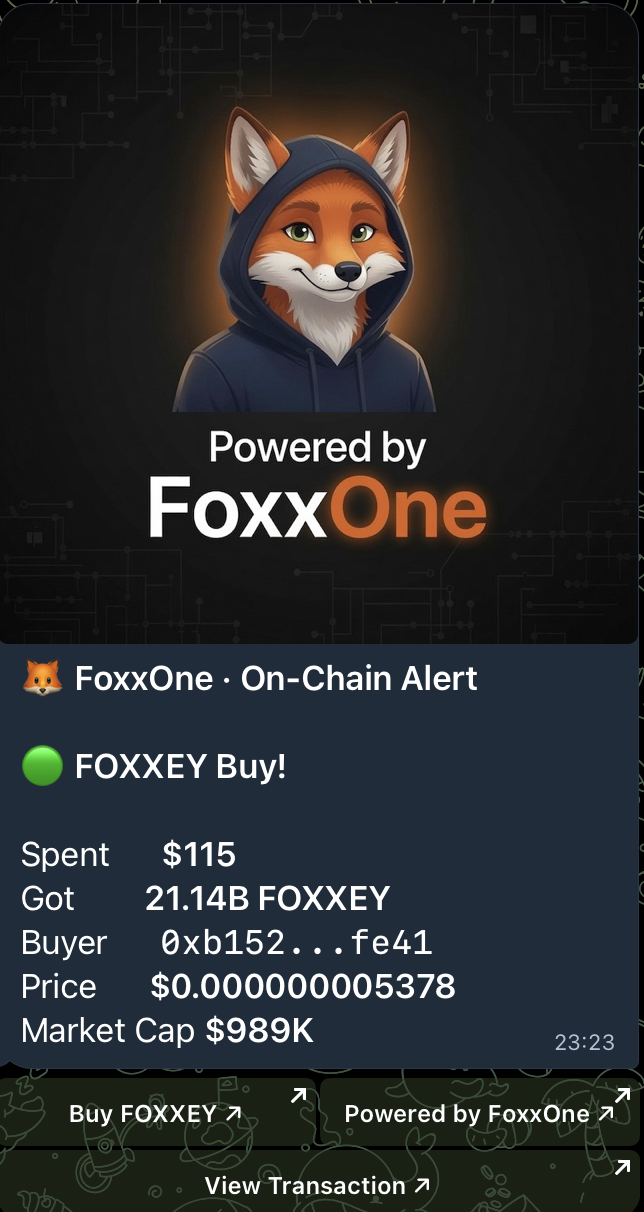
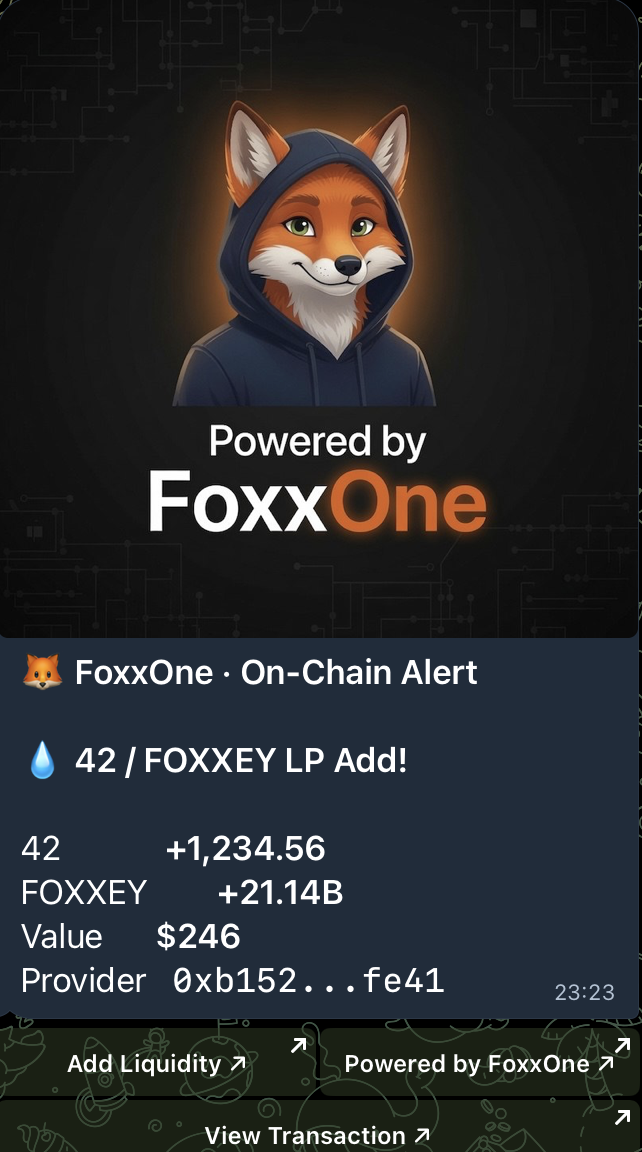
Real alerts from a Pulse channel. Buy alert (left) is what project channels and the
staker channel both receive. LP add (right) is staker-only. Sell alerts (staker-only)
use the buy layout with a red indicator; LP removals use the LP layout with a fire indicator.
Buy alertLP add alert
How it works under the hood
Source of truth
All Pulse data is read directly from on-chain state on Infinite Drive — DEX reserves,
swap events, LP balances. Token prices are derived from stable pairs via an on-chain
oracle; no external price feed, no third-party indexer, no API rate limits. If the
chain is up, Pulse is up.
Pair coverage
Pulse handles every DEX pair type natively — 42/stable, 42/token, and stable/token.
Every swap, every LP event, every new pair lands in the pipeline regardless of which
two assets are paired.
State persistence
Pulse persists its chain-scan position across restarts. If the bot is bounced for
maintenance, a host reboots, or the process is interrupted for any reason, scanning
resumes from the last finalised block — no events missed, no duplicates posted.
Latency
Alerts post within 2–4 blocks of confirmation. Only finalised events trigger alerts —
reorgs and dropped transactions are ignored, so you never see a buy that didn't actually happen.
Privacy
The bot stores only what's needed for tier verification and alert delivery — Telegram ID,
wallet address set at verify, and your alert preferences. It does not collect message
history or wallet activity beyond what's needed for tier checks.
Cost
Free for FOXXEY stakers (verified via the staking contract on Infinite Drive). Free for
projects on Infinite Drive. Funded by the 2% FOXXEY staking platform fee — the same
fee that funds FoxxOne validator and RPC infrastructure.